
Command
A daily briefing, live air-raid alerts and conditions, readiness scoring, an emergency plan, a journal, contacts and a search that reaches everything.
Advanced System for General Applications and Resource Deployment
One private system for your whole life's operations — situation awareness, journal and planning, a complete health center, and an encrypted vault for your files, media, gear, code and money. It runs on your own machine. Nothing leaves it.
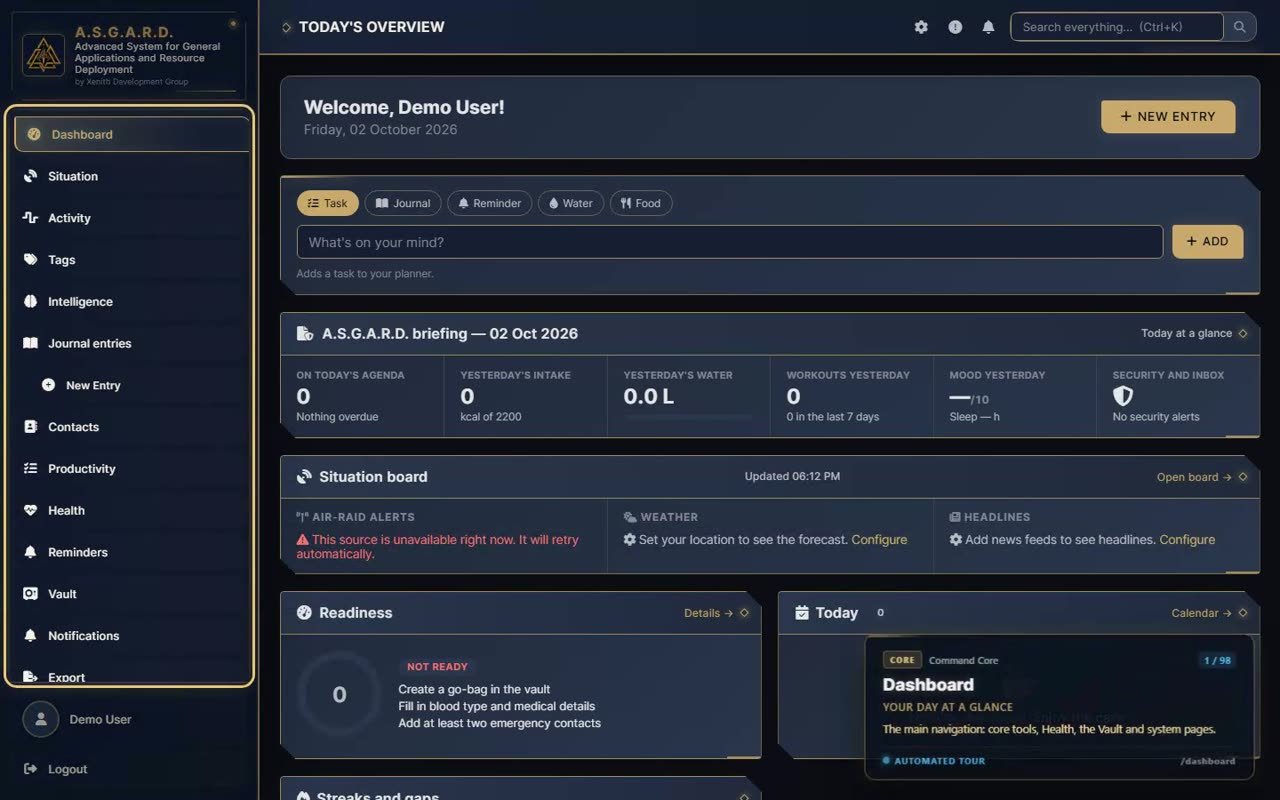
A recorded walkthrough of the whole system — every section, its side pages and what each one does. Jump straight to the part you care about.
Most people juggle a dozen apps for notes, tasks, health, passwords, photos, documents and money — each with its own account, its own cloud and its own idea of where your data lives. A.S.G.A.R.D. replaces them with one system you own, on hardware you control.
A daily briefing, live air-raid alerts and conditions, readiness scoring, an emergency plan, a journal, contacts and a search that reaches everything.
Planning, goals and habits, plus a full Health Center — nutrition, training, body, medical readings, progress charts and supplement cycles.
A second, locked layer: passwords and keys, notes, documents, books, photos, video, music, projects, code, 3D models, gear and finances — organised in real folders.
Each area has its own pages, but they share one search, one set of tags, one activity feed and one look.
The dashboard opens on a briefing of your day. The Situation board watches the world outside.
Tasks, a calendar that pulls everything together, and reports on what actually got done.
Seven areas, each with its own pages — and an overview that ties them to today's targets.
The Vault opens with its own master password and locks itself when you step away. Inside, it has its own navigation.
Real libraries, not file dumps — with readers, players and folders that nest.
Where the making happens — every project and category is a real folder your apps can open directly.
Accounts in their own currencies, every transaction, bills on the calendar, budgets and savings goals.
Runs on your own computer or home server. No accounts with anyone else, no third-party services.
Passwords, keys and secure notes are encrypted with your vault master password; the vault locks when idle.
Your files live in a normal data folder, organised the way the app shows them — open them in any program.
Playlists, albums, collections, bookmark folders and categories all nest, reorder and count their whole branch.
Resumable, any size, folders included — and they keep running while you move around the app.
Drop files, folders and links from your desktop; drag items onto folders; select many with Ctrl, Shift or a box.
Keep Personal and Business — or any others you create — completely separate.
The whole interface in both languages, switchable any time.
Preset themes and your own colours, fonts and layout.
Scheduled database backups, PDF and CSV exports, and a transfer package for moving machines.
Find anything from anywhere with Ctrl+K — entries, contacts, tasks and vault items.
Timed reminders with sounds, dose days, licence expiry and air-raid alerts, all in one notification centre.
Straight from the tour recording. Click any screen to enlarge it; use the arrow keys to step through.
A.S.G.A.R.D. is a web application you host yourself. Open it in any browser on the same machine or your home network.
Python and the app's requirements on Windows or Linux — one folder, nothing else to sign up for.
Pick where your files and database live — a large drive, a NAS share, anywhere you like.
Run python sitrep.py. It serves the app with Waitress and keeps its database up to date on its own.
Sign in, set your vault master password, and start moving your life in.
In a data folder you choose on your own machine: one database file plus your files, kept in ordinary folders that mirror how the app organises them. Nothing is sent to an outside service.
Passwords, product keys and secure notes are encrypted with your vault master password, which is never stored in plain text. The vault asks for that password separately from your sign-in and locks itself after a period of inactivity.
Yes. Each account has its own data and its own vault, and an administrator manages users and server settings from the admin panel.
Deleting is designed to be safe: folders and projects go to a trash folder inside your data folder, albums and playlists only remove the grouping, and libraries have their own trash to restore from.
Yes — it is a normal web app. Host it on a machine on your network and open it from any browser on that network.
Common images, iPhone HEIC and camera RAW formats (CR2, CR3, NEF, ARW, DNG and more) for photos; common video formats for Videos and Movies & TV, with previews generated in the background.
One place for the day's briefing, your health, your plans and everything private — running on hardware you trust.
Watch the tour again